What Is Free-Roam VR? Everything You Need to Know Before Your First Session
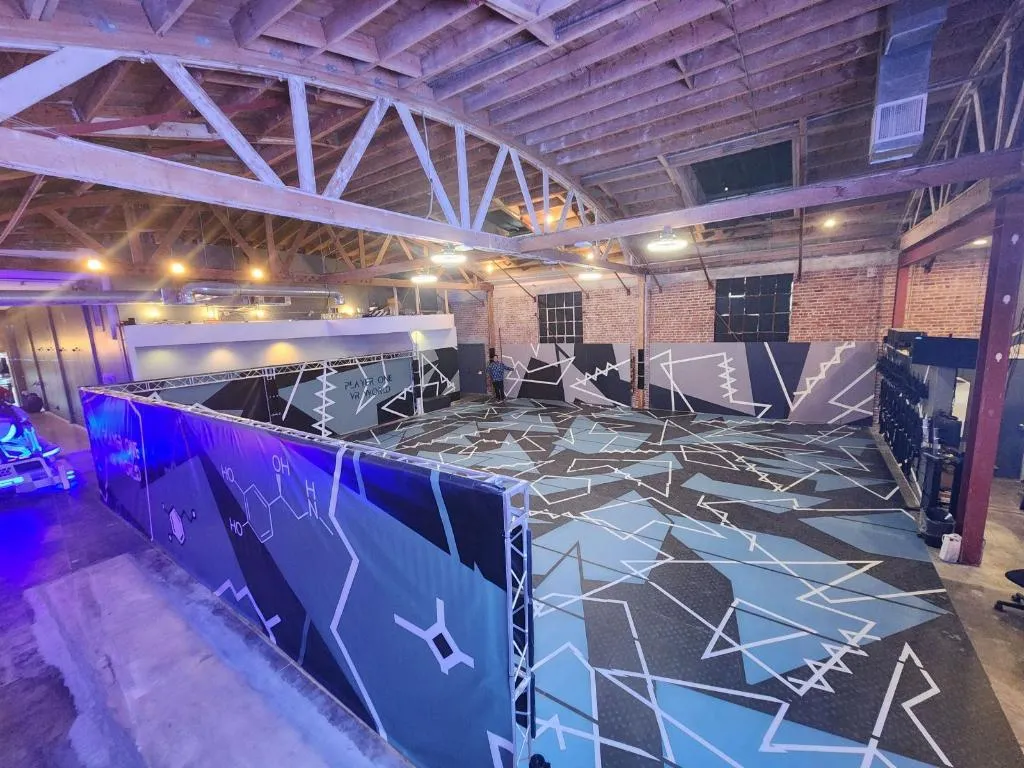
You've probably seen videos of people in VR headsets stumbling around their living rooms, bumping into furniture and walls. Free-roam VR is nothing like that. It's a purpose-built experience where you walk, run, crouch, and move freely through a large open arena — and every step you take in the real world is matched step-for-step in the virtual world. No joysticks. No teleportation. No sitting in a chair. Your body is the controller.
Free-roam VR is one of the fastest-growing segments of the VR entertainment industry, and Los Angeles has some of the best free-roam venues in the country. If you've been curious about VR but felt intimidated by the technology — or if you've tried stationary VR and found it nauseating or underwhelming — free-roam might be exactly what you're looking for.
What Is Free-Roam VR?
Free-roam VR is a type of virtual reality experience where you physically walk around a real room or arena while wearing a wireless VR headset. The space around you is tracked by sensors, and your movements are translated into the virtual world in real time. When you take a step forward in the real world, your character takes a step forward in the game. When you duck behind cover, your virtual self ducks. When you turn your head, the virtual world turns with you.
The "free-roam" part means you're not confined to a small play area or tethered to a computer by a cable. You have a large arena — typically 500 to 6,500 square feet — to move around in. You're wearing a wireless headset (and sometimes a backpack PC), so there's nothing restricting your movement. You can walk in any direction, explore the virtual environment naturally, and interact with other players who are in the arena with you.
The result feels less like playing a video game and more like being inside one. Your brain accepts the virtual world more readily because the physical sensations — walking, turning, crouching — match what your eyes are seeing. This sensory alignment is what makes free-roam VR feel so much more immersive than any other form of VR, and it's also why it's dramatically more comfortable for people who struggle with motion sickness.
How It Differs from Stationary VR
To understand what makes free-roam special, it helps to compare it with the more common stationary VR you might have tried at home or at a VR arcade.
Stationary VR
- You stand or sit in one spot (or a small area, typically 6x6 feet)
- Movement in the game is controlled by a joystick, thumbstick, or teleportation mechanic
- The headset is often connected to a PC by a cable (tethered)
- Your physical movements are limited to head turns, arm gestures, and small steps
- Examples: Home VR setups (Meta Quest, PSVR), most VR arcade stations at Los Virtuality, VR Hour, and Moonage VRcade
Free-Roam VR
- You walk freely through a large arena (hundreds to thousands of square feet)
- Movement in the game matches your real physical movement — no joystick needed
- The headset is wireless (standalone or connected to a backpack PC)
- Full-body movement: walking, running, crouching, leaning, turning naturally
- Multiplayer: you can see and interact with other players in the same physical space
- Examples: Player One VR, Battleground LA, Sandbox VR
The fundamental difference is this: in stationary VR, your brain knows you're standing still even though your eyes see movement. In free-roam VR, your brain feels the movement that your eyes see. That alignment changes everything — the immersion, the comfort, and the sheer fun of the experience.
The Technology Behind It
Free-roam VR relies on several pieces of technology working together seamlessly. Here's what's happening behind the scenes.
Wireless Headsets
The headset is the most visible piece of technology. In free-roam VR, the headset must be wireless — cables would restrict movement and create a tripping hazard. Most free-roam venues use either standalone headsets (like high-end versions of the Meta Quest) or headsets connected to lightweight backpack PCs. The headsets display the virtual world in high resolution with a wide field of view, and they update the display dozens of times per second to keep the visuals smooth as you move your head.
Spatial Tracking
This is the magic that makes free-roam work. Sensors — either built into the headset (inside-out tracking) or mounted around the arena (outside-in tracking) — constantly measure your position and orientation in three-dimensional space. The tracking system knows where you are in the arena down to millimeter precision, and it updates this information hundreds of times per second. When you take a step, the system detects it immediately and updates your position in the virtual world.
Hand Controllers
Most free-roam VR experiences include hand controllers that are also tracked in 3D space. These let you interact with the virtual world — picking up objects, firing weapons, pressing buttons, or gesturing at other players. Some premium venues (like Sandbox VR) use full-body motion capture that tracks your entire body, not just your hands and head, allowing the virtual world to reproduce your natural body language.
Multiplayer Synchronization
When multiple players are in the same arena, the system must track all of them simultaneously and synchronize their positions in the virtual world. This is computationally demanding — every player's position, orientation, and hand movements must be updated in real time for every other player. The best free-roam venues handle this so seamlessly that you forget it's happening. You simply look at your friend, see their virtual avatar moving naturally, and interact as if you're both really there.
Haptic Feedback (Premium Venues)
Some premium free-roam venues, particularly Sandbox VR, add haptic feedback suits that let you physically feel the game. Small motors in the suit vibrate and pulse in response to game events — impacts from combat, environmental effects like rain or wind, and tactile feedback when you interact with objects. This adds another layer of sensory alignment that makes the virtual world feel more real.
Why Free-Roam VR Causes Less Motion Sickness
VR motion sickness (formally called "cybersickness") is the number one barrier that keeps people from enjoying virtual reality. It happens when your eyes see movement that your body doesn't feel. In stationary VR, this disconnect is constant: you're pushing a joystick to walk through a virtual corridor, but your body knows it's standing still. Your inner ear (vestibular system) says "we're not moving," your eyes say "we're definitely moving," and your brain interprets this conflict as a potential poisoning event — which triggers nausea.
Free-roam VR largely eliminates this problem because there is no disconnect. When you walk forward in the game, you're actually walking forward. When you turn left, you're physically turning left. Your vestibular system and your visual system agree on what's happening, so your brain doesn't panic. The result is that many people who feel terrible in stationary VR feel perfectly fine in free-roam VR.
This doesn't mean free-roam VR is completely immune to motion sickness. Some games include brief moments of virtual movement that don't match your physical movement (like being in a virtual vehicle or elevator). And some people are exceptionally sensitive to any form of VR. But for the vast majority of players, free-roam VR is dramatically more comfortable than stationary alternatives.
If you've avoided VR because of motion sickness concerns, free-roam is the format to try. Tell the staff about your sensitivity — they'll guide you to the most comfortable experiences and help you have a great time.
What a Session Looks Like
If you've never been to a free-roam VR venue, here's a step-by-step walkthrough of what to expect.
Step 1: Arrive and Check In (5-10 minutes)
Arrive about 10-15 minutes before your session time. You'll check in at the front desk, sign a standard liability waiver (every VR venue requires this), and store any loose items like bags, jackets, and bulky jewelry. Wear comfortable clothes and flat shoes — sneakers are ideal.
Step 2: Gear Up (5-10 minutes)
A staff member will help you put on the VR headset and hand controllers. At premium venues like Sandbox VR, this also includes a haptic feedback vest and sometimes ankle and wrist trackers. The staff will adjust the headset to fit your head comfortably and make sure the display is clear. If you wear glasses, most modern VR headsets accommodate them — just mention it to the staff.
Step 3: Safety Briefing (2-5 minutes)
Before entering the arena, the staff will explain the basic controls, the boundaries of the play area, and safety protocols. The most important rule: the arena has physical walls, and the game will show you a virtual boundary when you're getting close to one. Respect the boundaries and you'll never bump into anything. The staff also explains how to signal if you need to stop (most venues have a simple hand gesture or button press).
Step 4: Enter the Arena (15-30 minutes gameplay)
This is the main event. You step into the arena, the virtual world appears around you, and the game begins. For the next 15-30 minutes (depending on the venue and game), you're fully immersed. You'll walk through virtual environments, interact with objects and enemies, communicate with your teammates, and experience whatever scenario the game presents — zombie survival, alien combat, fantasy adventures, puzzle challenges, or something else entirely.
The first minute is usually the most intense, as your brain adjusts to the virtual world. Most people experience a brief "whoa" moment when the virtual environment first materializes around them. After about 30 seconds, it starts to feel natural, and by the end of the session, you'll be moving through the virtual world as instinctively as you walk through your house.
Step 5: Debrief and Cool Down (5-10 minutes)
After the game ends, the staff helps you remove the equipment and gives you a moment to readjust to reality. At Sandbox VR, you'll watch a highlight reel of your gameplay (which is genuinely entertaining). At most venues, the staff will chat with you about how it went, answer questions, and — if you're interested — suggest other experiences to try. Total time from arrival to departure is typically 45-75 minutes, with 15-30 minutes of actual gameplay.
Where to Try Free-Roam VR in Los Angeles
Los Angeles has three standout free-roam VR providers, each with a distinct approach to the format.
Player One VR — Santa Monica & Glendale
Rating: 5.0 stars (826 reviews SM, 1,111 reviews Glendale) | Price: ~$50/pp | Group size: 2-8 players | Key features: Wireless headsets, full-body tracking, dedicated free-roam arena
Player One VR is the purest free-roam VR experience in Los Angeles. The dedicated arena is built specifically for free-roam gameplay, with wireless headsets and full-body tracking that let you move completely naturally. Games include cooperative zombie survival, competitive team battles, and adventure scenarios. The perfect 5.0-star rating at both locations speaks to the consistency and quality of the experience.
With two locations — one in Santa Monica near the Promenade and one in Glendale near the Americana — Player One VR is accessible from almost anywhere in LA County. Groups of 2-8 players can play together, making it work for everything from date nights to friend groups. The staff is consistently praised for being helpful and enthusiastic, especially with first-timers.
Battleground LA — Redondo Beach
Rating: 4.5 stars (55 reviews) | Price: ~$60/hr | Group size: 1-150 guests | Key features: 6,500 sq ft arena, free-roam + stationary VR + escape rooms, 90+ game library
Battleground LA in Redondo Beach takes free-roam VR and embeds it within a massive 6,500 sq ft entertainment center. The free-roam VR arena is one of several experiences available alongside 10 stationary VR gaming bays, VR escape rooms, karaoke rooms, arcade machines, and a giant projector screen. The scale is unmatched — with capacity for up to 150 guests, this is the go-to for large group events.
The free-roam arena at Battleground offers a different flavor than Player One VR. The larger space allows for bigger scenarios with more players. The trade-off is that the free-roam experience is one of many options rather than the sole focus, so the VR-specific attention isn't quite as concentrated. For groups that want free-roam VR as part of a bigger entertainment package, Battleground is the clear winner.
Sandbox VR — Culver City, Woodland Hills & Cerritos
Rating: 4.9-5.0 stars (4,167 / 9,841 / 5,284 reviews) | Price: ~$54/pp | Group size: 2-6 players | Key features: Full-body motion capture, haptic feedback suits, cinematic game scenarios, highlight reel video
Sandbox VR takes the free-roam concept and pushes it to its technological limit. Full-body motion capture (not just head and hands, but your entire body) means your virtual avatar reproduces your exact posture, gestures, and movements. Haptic feedback suits add physical sensation to the virtual world. The cinematic game scenarios are produced at a quality level that rivals movie studios. Three locations across LA County (Culver City, Woodland Hills, Cerritos) make it accessible from most areas.
Sandbox VR is the most premium free-roam VR experience in Los Angeles, and the review numbers back it up — the Woodland Hills location alone has nearly 10,000 Google reviews at a perfect 5.0 stars. The experience is so polished that even people who have never tried VR walk out saying it was one of the best entertainment experiences they've ever had. The highlight reel video you receive after your session is a nice touch that extends the experience beyond the venue.
Free-Roam VR Comparison Table
| Venue | Rating | Price | Group Size | Arena Size | Unique Feature |
|---|---|---|---|---|---|
| Player One VR (SM) | 5.0 stars | ~$50/pp | 2-8 | Dedicated arena | Purest free-roam, beach-adjacent |
| Player One VR (Glendale) | 5.0 stars | ~$50/pp | 2-8 | Dedicated arena | Purest free-roam, near Americana |
| Battleground LA | 4.5 stars | ~$60/hr | 1-150 | 6,500 sq ft total | Largest venue, multi-activity |
| Sandbox VR (Culver City) | 5.0 stars | ~$54/pp | 2-6 | Private room | Haptic suits, motion capture |
| Sandbox VR (Woodland Hills) | 5.0 stars | ~$54/pp | 2-6 | Private room | Haptic suits, motion capture, ~10K reviews |
| Sandbox VR (Cerritos) | 4.9 stars | ~$54/pp | 2-6 | Private room | Haptic suits, motion capture, closest to OC |
Who Is Free-Roam VR Best For?
First-Timers
If you've never tried VR, free-roam is arguably the best way to start. The natural walking movement is intuitive — you don't need to learn joystick controls or teleportation mechanics. Your body already knows how to walk, and that's all you need to do. The immersion is also at its highest in free-roam, which means your first VR experience will be as impressive as it can possibly be. Starting with a lesser experience might give you a skewed impression of what VR is capable of.
Motion-Sickness-Prone People
As discussed above, free-roam VR causes dramatically less motion sickness than stationary VR. If you've tried home VR and felt sick, or if you're worried about nausea, free-roam is your safest bet. The sensory alignment between your physical movement and the virtual world means your brain doesn't get the conflicting signals that cause cybersickness. Tell the venue staff about your sensitivity — they can recommend the most comfortable games and give you tips to stay comfortable.
Active People
If sitting still doesn't appeal to you, free-roam VR is your format. You're walking, running, crouching, dodging, and physically moving for the duration of the session. It's not a workout per se, but it's certainly more active than stationary VR, and you'll work up a light sweat on intense scenarios. Athletes, fitness enthusiasts, and people who generally prefer active entertainment over passive entertainment gravitate toward free-roam.
Competitive Groups
Free-roam VR is inherently social and competitive in a way that stationary VR often isn't. When you can see your teammates' actual body movements, coordinate positioning in physical space, and compete against other players in a shared arena, the competitive dynamic is electric. Friend groups, bachelor/bachelorette parties, team-building events, and any group that thrives on friendly competition will love the free-roam format.
Couples
The shared physical experience of free-roam VR creates stronger bonding than side-by-side stationary VR. You're in the same space, reacting to the same threats, covering each other, and celebrating together. The physicality of it — the instinct to grab your partner's arm or call out a warning — creates genuine connection that carries over into the rest of the evening. Free-roam VR at Player One VR or Sandbox VR makes an exceptional date night.
The Bottom Line
Free-roam VR is the most immersive, comfortable, and physically engaging form of virtual reality available today. By matching your real physical movement to the virtual world, it eliminates the disconnect that causes motion sickness, creates deeper immersion than stationary alternatives, and delivers the kind of experience that feels genuinely futuristic.
Los Angeles is one of the best cities in the world to try free-roam VR, with top-rated venues like Player One VR (pure free-roam arena), Battleground LA (massive multi-activity center), and Sandbox VR (premium motion-capture with haptic suits) all operating across the metro area.
If you've been curious about VR but haven't taken the leap — or if you've tried stationary VR and were disappointed — free-roam is the experience that will change your mind. Book a session, show up in comfortable clothes, and let your body do what it already knows how to do: walk, explore, and play.